SHOTVERO — AI SCREENSHOT ASSISTANT

A moment captured.
A point made.

Capture your screen. Add a little clarity. Share directly.
For images and video that start on your device.

Chrome / Edge extension · English / 日本語 · Coming soon

Edit and recognize text on your device

No account for the basics

Encrypted, direct file sharing

01 / CAPTURE

Worth keeping?
Make it a capture.

An interesting page, a moment in a video, a post to revisit. Capture what matters, right from your browser.

FREE

The view, or the whole page

Capture from the extension icon, including long, scrolling pages.

That one frame in a video

Extract a frame from a playing video and bring it straight into the editor.

A post, all together

Choose a post on supported X or Instagram pages and capture it.

YouTubeXInstagram

Supported videos and posts only. Site structure, content protection, and browser restrictions can prevent capture.

Shotvero · capture
IDEAS & INSPIRATION

An idea worth keeping

Save the part that caught your eye.

Full-page capture
A frame from a video00:12
Illustration of the feature workflow
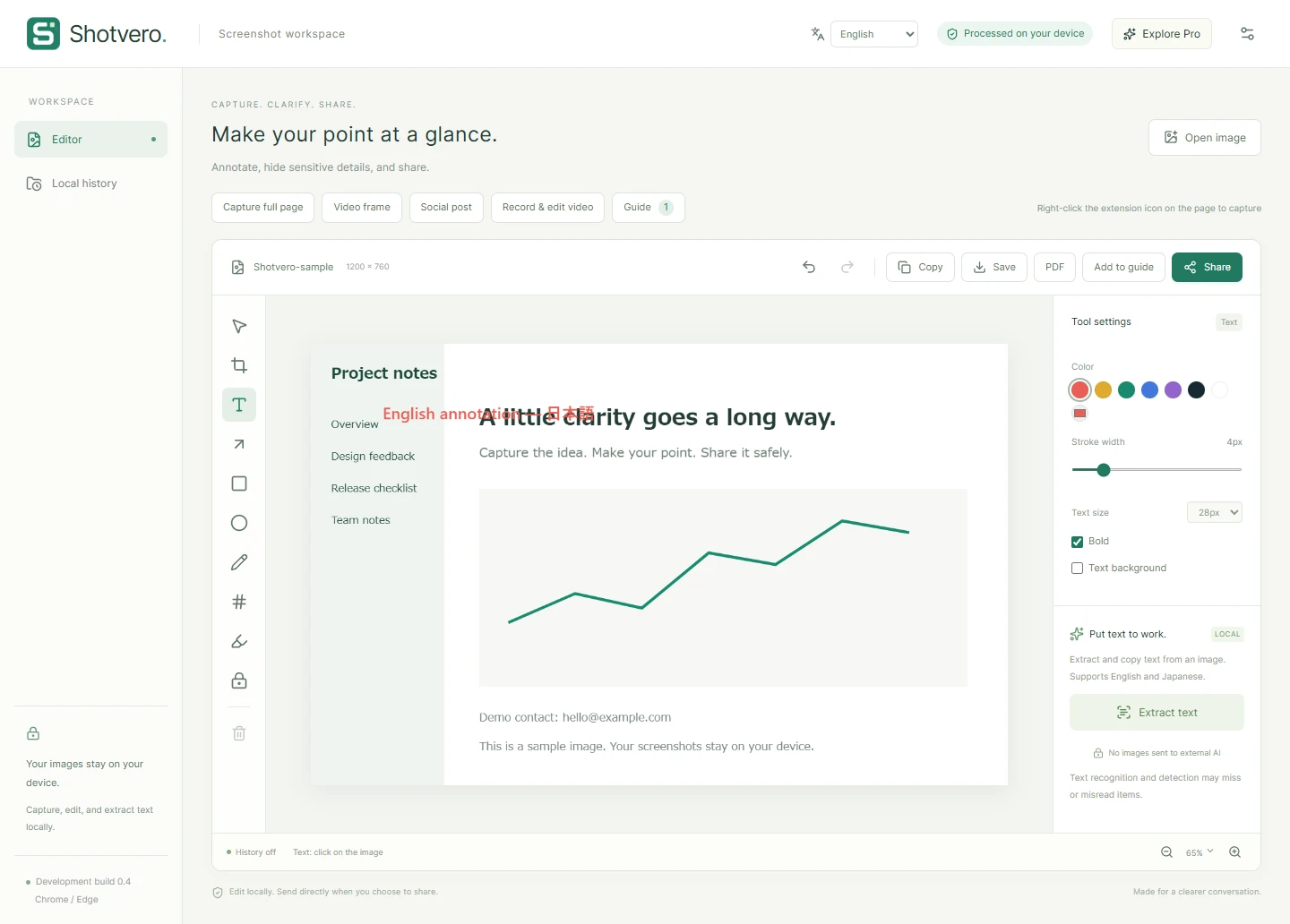
Shotvero image editor with text, arrow, redaction, OCR, save, and share tools.
Actual development interface. Appearance and features may change before release.
02 / CLARIFY

Make “right here”
easy to see.

An arrow or a few words can save a long explanation. Before sharing, cover the details you want to keep private with solid redaction.

Text, arrows, numbersHighlights and croppingSolid redaction
LOCAL AI

Get the words out of your images.

English and Japanese AI text recognition (OCR) runs on your device. Review detected candidates, such as email addresses, and choose what to hide.

Recognition can misread or miss details. Review the image before sharing.

03 / SHOTVERO PRO

When a picture needs
a little more story.

Explain an interaction, capture a gaming moment, or hand a process to your team. Add video and PDF guides to your toolkit.

See Pro pricing

Record a little. Show what matters.

Select a tab, window, or screen and record for up to 10 minutes. Import and trim video, or extract a still frame for your next image.

Up to 10 minutes / 512 MiB. Audio depends on your OS and browser. No always-on recording or instant replay.

Turn screenshots into a useful guide.

Arrange images, add a heading and instructions, then export a PDF. Bring up to 20 screenshots together in one clear document.

Illustration of the feature workflow

MADE FOR YOUR EVERYDAY

For work. And everything after.

Reviews and feedback

Point to the change with an arrow so everyone sees the same thing.

Gaming and video moments

Start a short recording when you need it. Turn a frame into an image and add your take.

Research and how-tos

Keep a page or post as a visual note. Use Pro to turn multiple screens into a PDF guide.

04 / PRIVATE SHARING

From your screen.
To their device.

Encrypt your file and transfer it directly to the other browser, without storing it on a file-sharing server.

Both people must be online. Some networks cannot establish a direct connection; save the file if needed.

PRIVATE BY DESIGN

Privacy is part of the workflow.

Your images stay out of AI servers.

Image editing and text recognition run in the browser. Shotvero has no feature that sends your screenshots to train an external AI.

No hosted screenshot library.

Encrypted files transfer directly over WebRTC. A server helps the peers connect, but does not store the image or video file.

Clear about the data we do need.

Login email, subscription records, and connection information for abuse prevention support the service. Our policy explains what we handle.

Read how your data is handled
SIMPLE PLANS

Start with the basics. Make room for more.

Core image tools are free. Go Pro when you need video and documentation.

Shotvero Free

FREE

For everyday screenshots

$0Free

No credit card for the core features

For everyday captures and clearer conversations.

  • Visible-area and full-page capture
  • Text, arrows, shapes, and solid redaction
  • On-device English and Japanese OCR
  • PNG / JPEG export and P2P image sharing
Check availability

No account for the basics

Shotvero Pro

PRO

For video and documentation

$5USD / month

Or US$50 / year, billed annually

For video, social posts, and step-by-step stories.

  • Everything in Free
  • Video-frame and social-post capture
  • Recording up to 10 minutes, video import and trimming
  • Extract still frames from video
  • PDF export and screenshot guides
About the launch

Save US$10 compared with 12 monthly payments.

Monthly and annual plans renew automatically. Cancel the next renewal at any time.

Prices are in US dollars (USD), inclusive of applicable service taxes. Your internet provider or card issuer may charge separate connection, foreign exchange, or international transaction fees. We are preparing for launch and are not accepting paid subscriptions or payments yet. Card payments will be processed through Stripe after launch.

Cancellation & refunds · Commerce disclosure

COMING SOON · WINDOWS / MACOS

Start in the browser you already use.

Coming to Chrome and Edge on Windows and macOS, with English and Japanese interfaces.

Standalone Windows and Mac apps are planned for the future.

Contact
GOOD TO KNOW

A few things,
up front.

Supported environments, possibilities, and practical limits.

Contact
Can I install Shotvero now?

We are preparing the official release. Once it is published, this website will link to the official extension store listing. We are not accepting payments or paid subscriptions yet.

Does it work on Windows and Mac?

The first release is an extension for desktop Chrome and Edge, intended for supported browsers on Windows and macOS. Standalone Windows and Mac apps are a future plan and are not included in the current paid plan.

Can it capture everything on YouTube, X, and Instagram?

It works with supported videos and posts visible in your browser. Site changes, DRM, and browser restrictions can prevent capture. Shotvero is not affiliated with these platforms. You are responsible for respecting copyright and each platform’s terms.

Can I record gameplay?

Pro recording lets you select a tab, window, or screen supported by the browser, up to 10 minutes and 512 MiB. There is no always-on recording or instant replay buffer. Some games and protected screens cannot be recorded. Audio availability depends on your OS and browser.

What is P2P sharing?

P2P (peer-to-peer) means sending a file directly from one device to another. Shotvero encrypts the transfer without storing the image or video on our servers. A server helps the browsers connect. Both people must be online and keep their sharing pages open until the transfer finishes.

Can someone open a P2P link later?

Both sender and recipient need to be online at the same time. A share expires after about 10 minutes, accepts one recipient, and ends after receipt. Some networks cannot establish a direct connection. You can save the file and use another sharing method.

Will AI catch every sensitive detail?

No. OCR and detection can make mistakes or miss information. Review the whole image and cover sensitive areas before sharing. OCR supports English and Japanese; it is not image generation or a writing assistant.

What happens when I cancel Pro?

After launch, open Pro & account in the extension and use the billing portal to stop the next renewal. Pro remains available through the paid period, then your account returns to Free. Uninstalling the extension does not cancel a subscription.

A clearer picture. A better conversation.

Shotvero is getting ready for its official release. For product questions or business inquiries, get in touch with IMAKAI Inc.

Get in touch